

This is how you connect your Windows device to eduroam:
1
If eduroam is already set up on your device, please remove it first.
Instructions can be found here.
2
Download the eduroam configuration tool for Windows 10 & 11 and start the installation with a double click.
Notice
If your device has no internet connection you can use the openly available @BayernWLAN-WiFi on campus.
If your device has no internet connection you can use the openly available @BayernWLAN-WiFi on campus.
3
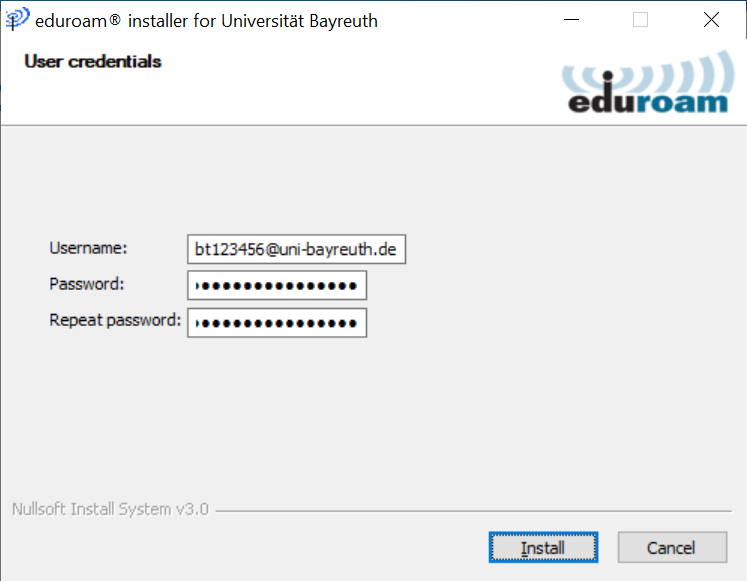
Follow through with the installation and when you reach the step User credentials, enter your Uni username + @uni-bayreuth.de as username (e.g. bt123456@uni-bayreuth.de) and the corresponding password.
Afterwards, click Install.
4
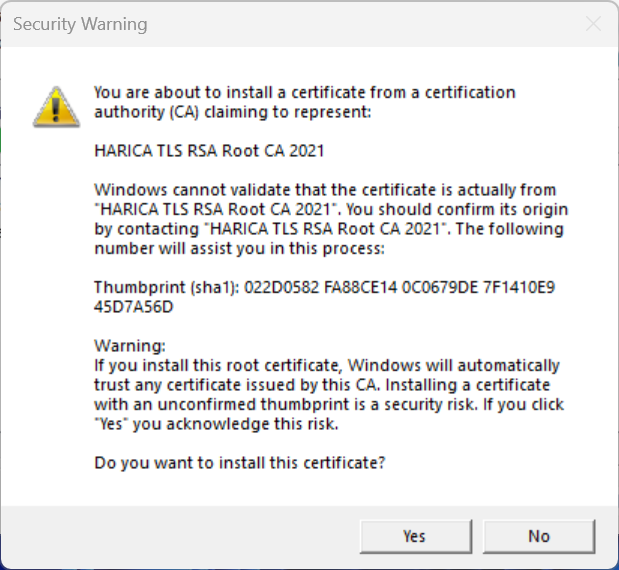
Answer the question if you want to install the certificate HARICA TLS RSA Root CA 2021 with Yes.
Notice
On some devices, this question won't appear.
On some devices, this question won't appear.
5
That's it! If you used the @BayernWLAN WiFi you should remove it from your device so it won't automatically connect unintentionally.
Problems with these instructions? Let us help you! Contact us fast and easy through our contact form!