

This is how you set up eduroam under Linux (using Ubuntu as an example):
1
If eduroam is already set up on your device, please remove it first.
Instructions can be found here.
2
You need the CA certificate HARICA TLS RSA Root CA 2021. In most Linux distributions it already exists, in Ubuntu e.g. under
/usr/share/ca-certificates/mozilla/HARICA_TLS_RSA_Root_CA_2021.crt
Alternatively, you can download it here.
3
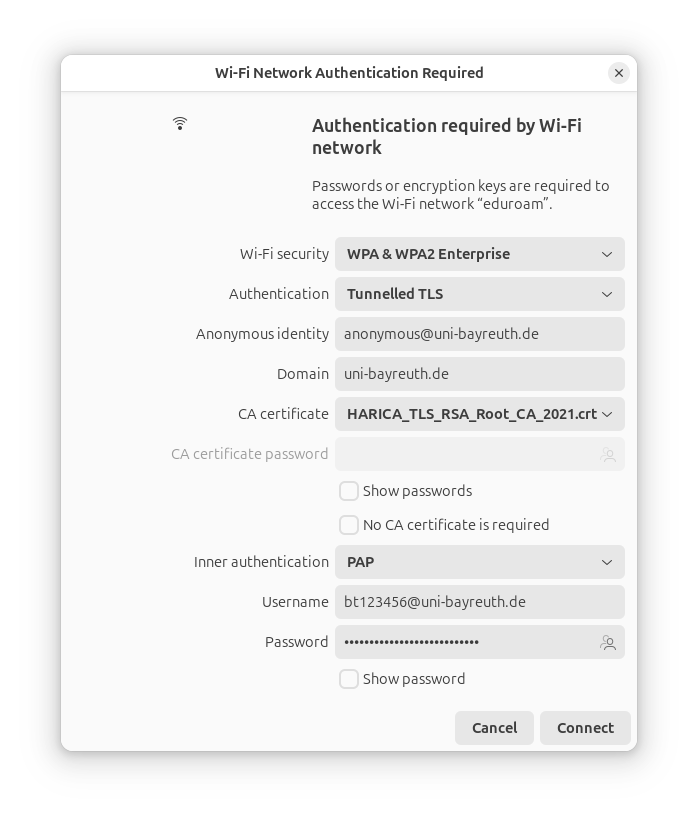
Now connect to the eduroam-WiFi.
Use the following settings:
- Authentication / EAP method: Tunneled TLS bzw. TTLS
- Anonymous identity: anonymous@uni-bayreuth.de
- Domain (if present): uni-bayreuth.de
- CA certificate: HARICA TLS RSA Root CA 2021 (see previous step)
- Inner authentication: PAP
- Username: Your Uni username + @uni-bayreuth.de (e.g. bt123456@uni-bayreuth.de)
- Password: Your Uni password
Notice
If you have downloaded the certificate it has to stay where it was during the connection setup! It will not be "imported".
If you have downloaded the certificate it has to stay where it was during the connection setup! It will not be "imported".
4
That's it!
Problems with these instructions? Let us help you! Contact us fast and easy through our contact form!